Plan the day before the truck leaves
Many snack and candy routes don’t run the same stores on the same day every week. Stores are added, dropped and moved around, and the day is often decided by area: one city today, another tomorrow. A route sheet written the night before or first thing in the morning gives the driver and the office the same list to work from.
- Pick the area first. Choose the city or part of town the truck will cover, then list the stores there that are due for a visit.
- Put the stops in driving order. Start with the store nearest the warehouse or the first city, and work outward so the truck isn’t crossing back over its own path.
- Move stores with receiving hours to the front. If a store only takes deliveries in the morning, or is closed on certain days, schedule it first and note it on its line.
- Add what the driver needs to know. A product the store asked for last time, a balance the owner said would be paid, or shelves that need a date check go in the notes column.
- Load the truck from the list. With the stores and notes in front of you, it’s easier to see what has to go on the truck before it leaves.
The daily route sheet
Three parts: the route, the stops and the notes. Totals add up as you type. Turn on “Group by city” to sort the stops under each city in the order they first appear. Press “Load example” to see a filled-in day first.
Daily route sheet
1Route
2Stops0 of 0 done
3Notes
Daily route sheet from tallysnack.com/templates/daily-route-sheet/
A general business template. Example data is made up.
What to write at each stop
The sheet is most useful when each line is filled in before the truck pulls away from the store, not at the end of the day from memory.
- Invoice numberEvery invoice written gets a line, so the office can see a missing number right away.
- Amount and paidThe invoice total after credits, and what the store paid. Anything not paid shows in the Left column.
- CreditsThe dollar value of expired or damaged product taken back, so credits can be checked against the return log.
- DoneCheck the store off when the visit is finished. Unchecked lines at the end of the day are the stores that were missed.
- Skipped storesIf a store was closed or the owner wasn’t there, write why in the store changes box. It decides when the store gets visited next.
- New requestsA new product the store wants, a different visit day or a price question goes in the notes before the next stop.
After the route
The route sheet and the end-of-day settlement go together. The route sheet shows which stores were visited and what each invoice came to. The settlement sheet takes those invoices and checks them against the cash and checks the driver brings back. Our route settlement sheet is built for that step.
Keep the route sheets for a few weeks and they also show patterns: stores that are skipped often, stores that always leave a balance, and cities that take longer than planned. Those are the stops worth looking at when you plan the next week.
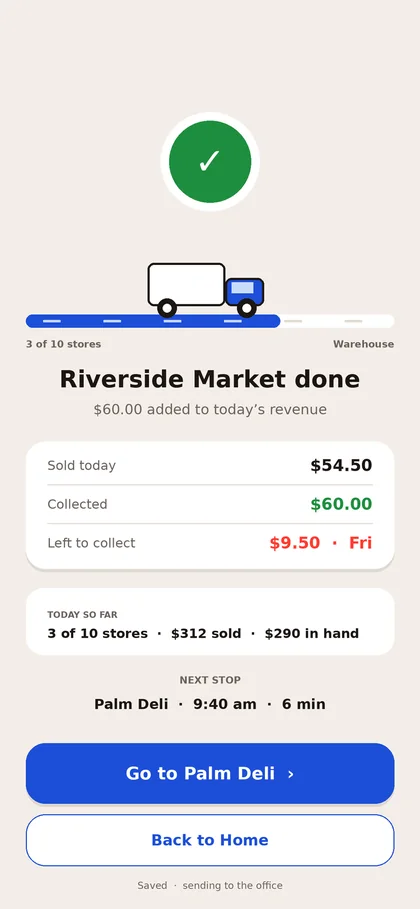
In Tallysnack, the driver’s phone keeps the stop list. Each store is marked done as the visit finishes, with what was sold, what was collected and what is left, and the next stop shows on the same screen.
The office sees the same day as it happens, without a paper sheet to collect at night.
Using the Excel version
The workbook has two sheets. Route sheet matches the sheet above, with 25 stop lines: type each store, the amount and what was paid, and the Left column and the totals fill in. It is set to print on one landscape page. Store list keeps every store with its city, address, contact and visit notes, so you can sort it by city and copy the day’s stores into the route sheet. Save a copy of the Route sheet for each day, or clear the yellow cells and reuse it.
Questions
What is a daily route sheet?
A list of the stores a truck will visit in one day, in driving order, with space to record what happened at each stop. Some companies call it a route list, stop sheet or driver log.
How many stops fit on one page?
The printed sheet fits about 20 stop lines on one landscape Letter page. Lines left empty still print, so the driver can add stores by hand. The PDF adds a second page when there are more stops than fit on one.
Should the stops be in order by city?
If your day is planned by area, yes. Turn on “Group by city” and the stops are sorted under each city, keeping the order you typed within each city. Turn it off to keep your own order across cities.
Is this the same as the settlement sheet?
No. The route sheet is the plan and the record of each stop. The settlement sheet is the end-of-day count of cash and checks against the invoices.
Can the driver fill it in on a phone?
Yes. On a phone the stop lines turn into cards, and everything saves in that phone’s browser as it is typed. It is not shared with the office automatically; print it or save the PDF to hand it in.
Is what I type sent anywhere?
No. Everything you type stays on this device, in this browser, and comes back when you reopen the page. The PDF is built on your device as well. Use “Clear sheet” to remove it. See the privacy notice at the bottom of the page.
Related for DSD teams
Run the day’s stops from the driver’s phone.
Tallysnack keeps the stop list, the invoices, credits and payments on the driver’s phone, and shows the office each truck’s day as it happens. We are building it now. Join the list for monthly updates on the build.
Who we are. Tallysnack makes route software for direct store delivery (DSD) snack, candy and beverage distributors. It’s built by a family that has run snack routes for more than 30 years, and it is in development. See how it works