Route software vs Excel: signs your route has outgrown the spreadsheet
Most route businesses run on a spreadsheet at some point, and for a while it works. This guide covers what Excel does well, where it starts costing you once there are more trucks and more stores, and an eight-question check to see which side of that line you’re on.
What Excel does well
Excel isn’t the problem on day one. For a single truck and a short store list, it can be the right tool.
Nothing new to buy
If your office already has Microsoft 365 or another spreadsheet program, there’s no extra bill.
Shaped your way
Columns, totals and reports work exactly how the owner thinks about the business.
No training
The person who built the file knows it, and most office staff have used a spreadsheet before.
Good for one-off questions
Pricing a new product line, comparing two routes, or a year-end look back.
Where it breaks on a route
The trouble starts when the work leaves the desk. A route business happens on trucks and at store counters, and a spreadsheet lives in the office.
Every sale is entered twice
Drivers write invoices on paper at the store, and someone types them into the file that night. Each sale now has two copies, and each can be wrong in its own way.
Several copies of one file
Once two drivers or two office people each keep their own copy, you get files like Route_FINAL_v3, and nobody is sure which one is current.
Any cell can be typed over
A price or a payment can be changed without anyone noticing. Unless the file is locked down and kept in a cloud service with version history, there’s no simple way to see who changed what, and when.
Formulas break quietly
A row added below a total, or a total that stops one row short, gives a wrong number that looks right until someone checks it by hand.
Credits fall through the gap
Expired product is taken back at the store and written on paper. If the credit is missed when the invoices are typed in, the store’s balance is wrong from that day on.
Who owes what lives in another tab
Balances get updated by hand when a store pays. A payment typed against the wrong store, or not at all, usually turns up only when the store disputes it.
The day closes late
A truck’s cash can only be matched to its invoices after the invoices are typed in, so the close waits for the typing.
The owner sees yesterday
The file is only as current as the last time someone typed into it. Today’s sales are on paper in the trucks.
Excel and route software, side by side
The route software column describes what this kind of product is built to do. Features vary by product, so ask each vendor about anything that matters to you.
| Job | Excel | Route software |
|---|---|---|
| Cost to start | Nothing extra if you already have it. | A monthly subscription. See what route sales software costs. |
| Setup | Build your own sheets and formulas. | Enter or import stores, products and prices once. |
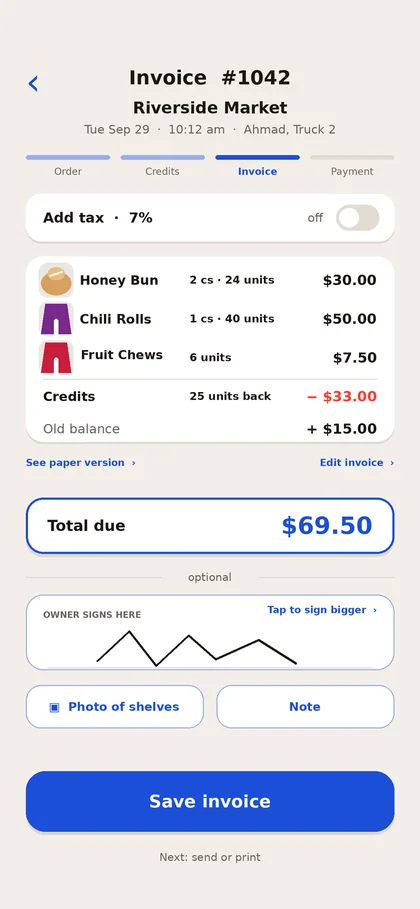
| Invoice at the store | Written on paper, typed in later. | Made on the driver’s phone or tablet, then printed or sent. |
| Credits | Copied from paper, easy to miss. | Recorded on the invoice at the store, with a reason. |
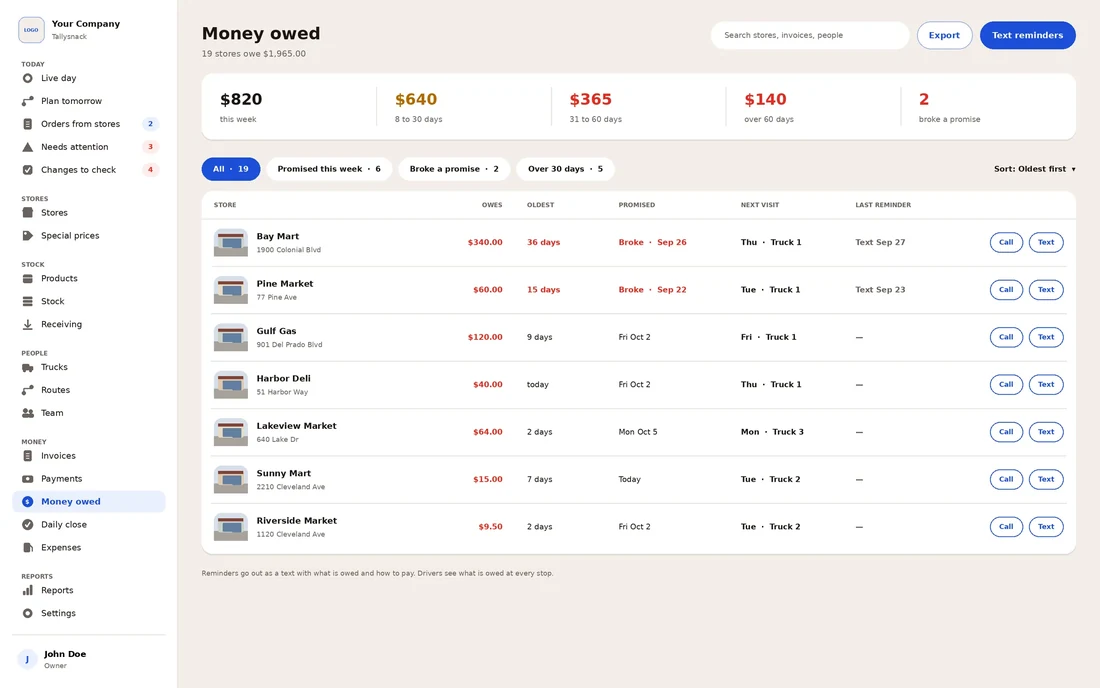
| Payments and balances | Updated by hand in a separate tab. | Updated when the driver takes the payment. |
| End-of-day close | After everything is typed in. | From the day’s invoices once the truck is back. |
| Several drivers | Separate copies, or one shared file. | Each driver on their own device, one set of records. |
| Changes | Any cell can be overwritten. | Usually tracks who did what. Ask how each product handles it. |
| Reports | Whatever you build. | Built in. Exports to a spreadsheet vary by product. |
Have you outgrown Excel?
Answer eight questions about how your route runs today. Nothing you choose leaves your browser.
Answer the questions to see where you stand.
Each “yes” is a job the spreadsheet is making harder.
Where the lines fall (0–2, 3–5, 6–8) is our own rule of thumb, not an industry standard.
What moving off Excel looks like
The file you have is the start of the new system. Most of the work is cleaning it up.
Clean the store list. One row per store with its name, address and owner, and remove the stores you no longer serve.
Clean the product and price list, including any special prices for particular stores.
Write down every open balance on the day you switch, store by store, and settle any the store disputes before you move them.
Run one truck on the new system for a week while the others stay on the old way.
Move the rest of the trucks, and keep the old file as a read-only record.
Ask any vendor whether it can import your store and product lists from a spreadsheet, and in what format.
How Tallysnack handles the same jobs
Tallysnack is route software for DSD snack, candy and beverage distributors. Drivers write invoices, credits and payments on the phone at the store. The office sees sales, money owed and each truck’s close without typing anything in.
Questions
Can I keep using Excel alongside route software?
Yes. Many owners keep a spreadsheet for one-off analysis and planning. The difference is that the day-to-day record of sales, credits and payments lives in one place instead of being retyped.
Is Google Sheets any different?
Google Sheets keeps one shared copy in the cloud with version history, which solves the problem of several files. The rest stays the same: invoices are still written somewhere else and typed in, and the day still closes after the typing.
When is Excel enough?
Usually with one truck, a short store list and an owner who drives the route or settles it the same evening. If the check above comes back with two or fewer yeses, a good template and a daily close may be all you need. Our route invoice template and route settlement sheet both come with an Excel version.
How much does route software cost?
It depends on the product and how it charges, usually per driver or per user each month. Our guide to what route sales software costs compares the public prices we found.
Are my answers to the check sent anywhere?
No. The check runs in your browser and nothing you choose is saved or sent. See the privacy notice at the bottom of the page.
Related for DSD teams
Stop typing the route in at night.
Tallysnack puts invoices, credits and payments on the driver’s phone, so the office has the day’s numbers when the trucks come back. We are building it now. Join the list for monthly updates on the build.
Who we are. Tallysnack makes route software for direct store delivery (DSD) snack, candy and beverage distributors. It’s built by a family that has run snack routes for more than 30 years, and it is in development. See how it works