Route accounting software for snack distributors
Route accounting software runs the money on a snack route: orders, expired credits, invoices, payments and the end-of-day cash count. Here is how a full route day works with it, and what to look for when you choose one.
What route accounting software does
On a direct store delivery (DSD) route, the driver takes the order, stocks the shelf, takes back expired product, writes the invoice and collects the money. Route accounting software puts all of that on the driver’s phone and sends it to the office as it happens.
Route planners
Put stops in order and give directions. No invoices, credits or money owed.
Field sales apps
Track reps and take orders. The money at the store is often left to another system.
Route accounting
Runs the whole stop: order, credits, invoice, payment and the daily cash close.
A snack route day, step by step
The driver picks today’s stores by city, and the app puts them in the fastest order with turn-by-turn directions. Then, at every store:
-
Take the order
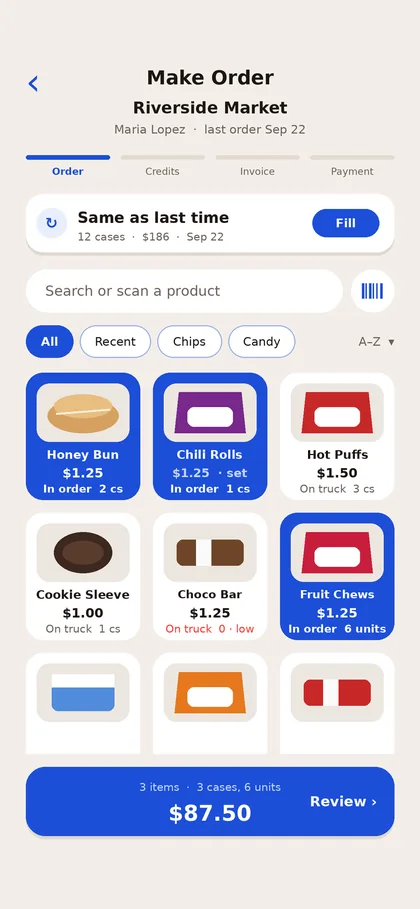
The driver adds what the store needs by case, pack or unit. Each store’s special price fills in by itself, and every total is worked out on the phone.
Make Order -
Credit expired product
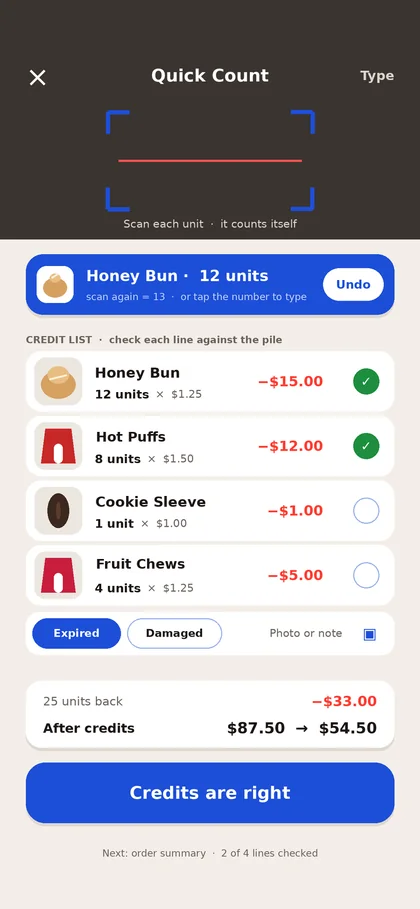
The driver scans each expired unit, or scans one and types how many. The credit uses the price that store paid and comes off today’s invoice.
More on this in our expired product credits guide.
Quick Count -
Make one invoice
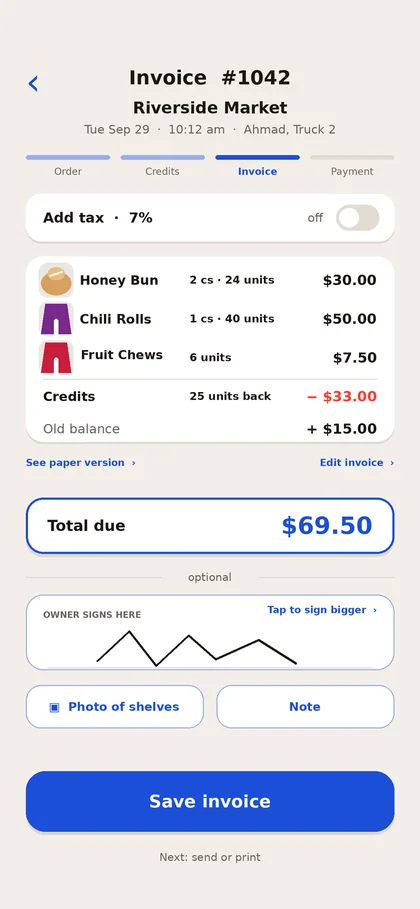
The order, the credits and the store’s old balance land on one invoice. Send it by text or email, or print it on an 80 mm receipt printer with your logo.
One invoice -
Take the payment
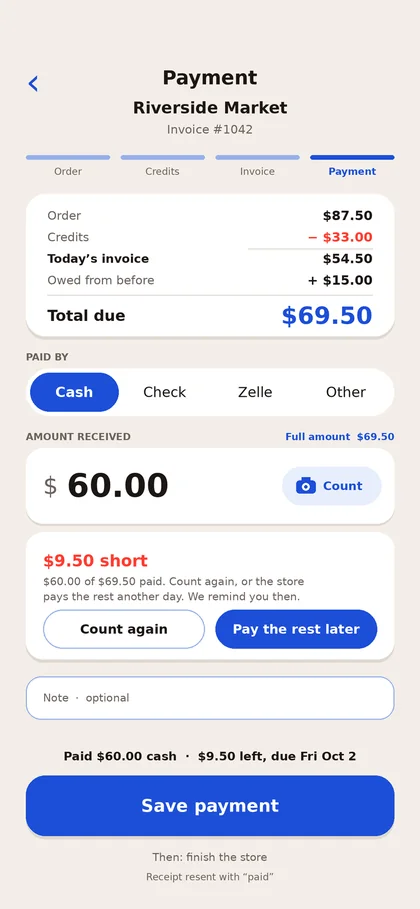
Cash, check, Zelle or another method. If the store pays short, the driver sets a due date and gets a reminder that morning.
Short payment, due Friday -
The office sees it live
Every truck, sale and payment shows on the website as it happens. A store calls in an order? The office sends that stop to a driver already on the road.
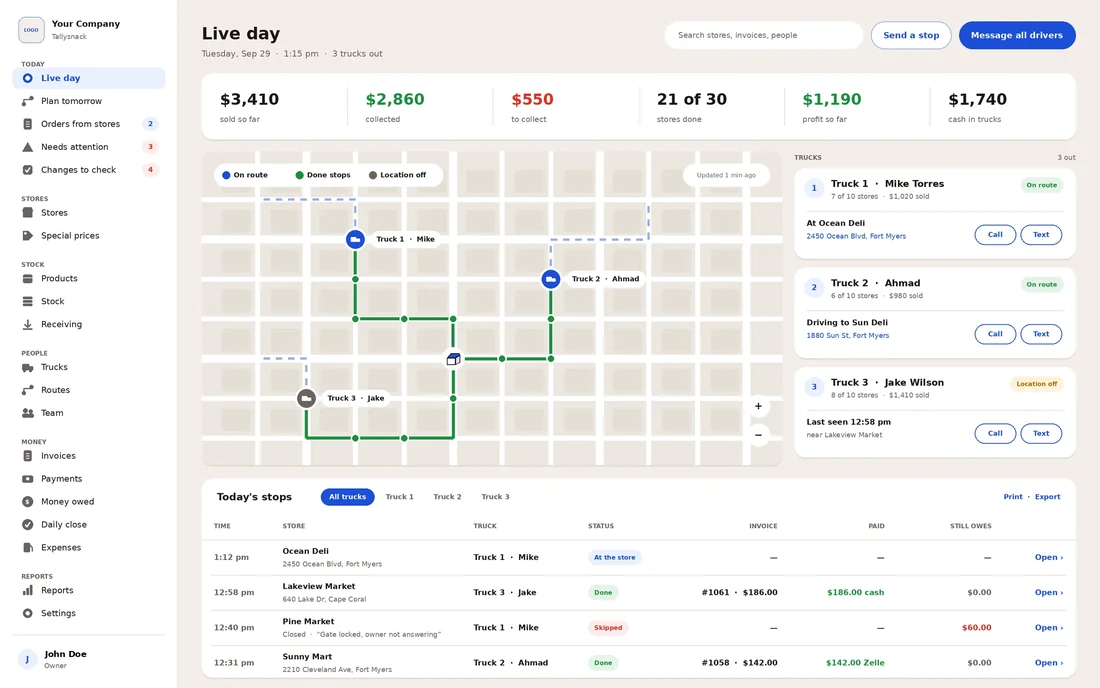
Live day on the website -
Close the day
The app already knows the cash and checks each driver should have. A photo of the cash suggests the count, and the owner gets the day’s numbers by email at night.
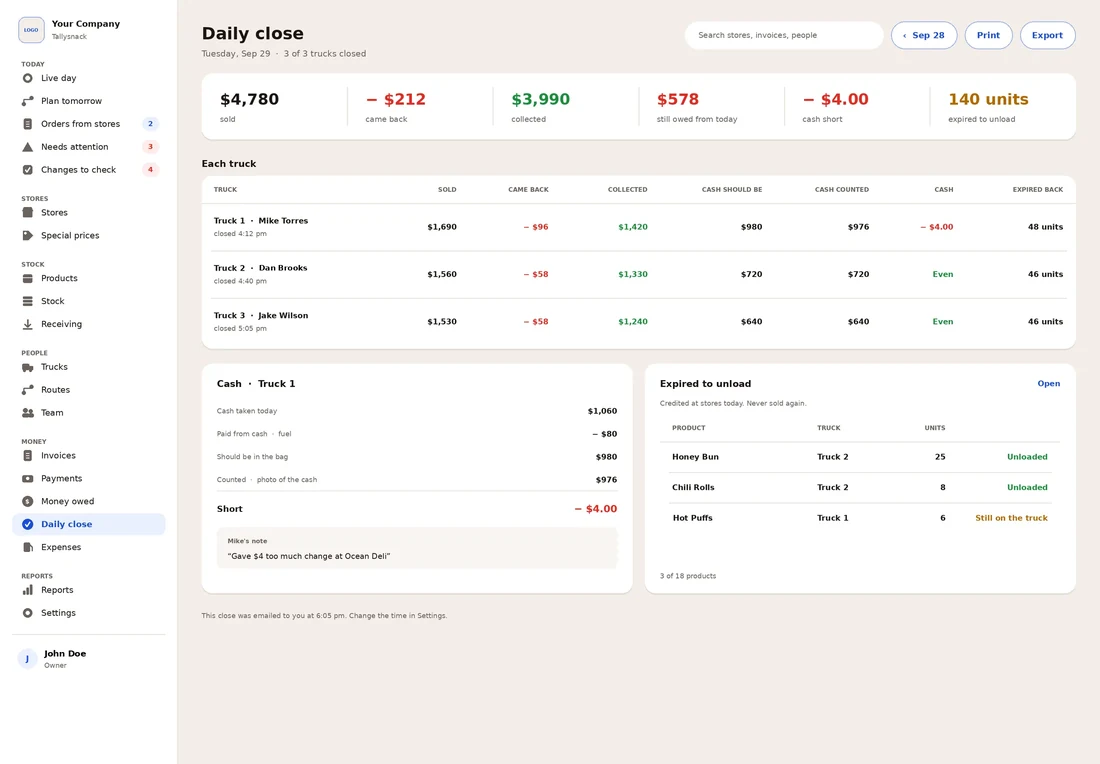
The daily close
No signal in a back room? Everything works offline and sends once when signal returns. Screens are from the Tallysnack design.
What changes for your team
Paper invoice books cost money in small ways every day. This is what route accounting fixes for each person.
No more math
- Every total worked out on the phone
- Store prices fill in by themselves
- New drivers finish a visit on day one
No more typing
- Invoices and payments arrive as they happen
- No lost carbon copies
- Every change logged with who and when
Every dollar in view
- The daily close by email each night
- Money owed by store and due date
- Costs and margins hidden from drivers
See the full math in paper invoice books vs route software.
What to look for in any route accounting software
Use this on every app you look at, including ours. Tick what it does.
Getting started
Switching from paper takes less time than most owners expect.
- Import your stores and products from any spreadsheet, with special prices and cases, packs and units.
- Enter open balances and your next invoice number, so records carry on where paper left off.
- Run one truck for a week, then add the rest. Or we load everything for you for $300, paid only after you check it.
Plans and pricing
Priced by drivers. Stores, products and trucks are unlimited, and every feature is on every plan.
Extra driver $45 a month; extra office login $20. Annual plans cost ten months’ price. 30-day money-back guarantee. Compare with others in what route sales software costs.
Questions
Is DSD software the same as route accounting software?
Mostly. DSD (direct store delivery) software is the wider term. Route accounting is the part that handles invoices, credits and money. Van sales software is another name used when drivers sell from the truck.
Does Tallysnack work without cell signal?
Yes. Orders, credits, invoices and payments all work offline and send once when signal returns.
Does it connect to QuickBooks?
Version 1 exports your records to a spreadsheet. A QuickBooks Online connection comes After launch.
Can drivers see my costs and profit?
No. Only the owner, and the office people the owner allows, can see costs, margins and profit.
Does it take card payments?
Version 1 records cash, checks, Zelle and other payments. Card payments on the phone come After launch.
When can we start?
Tallysnack is in development. Early access opens to the first 10 companies, who get 20% off for the first 12 months, setup at no cost, and their money back in full if we do not deliver.
Written by the Tallysnack team from how our family’s routes run and from the Tallysnack Version 1 design. Features marked After launch come later, and screens may differ in small details.