Tallysnack Route guides

Route problems · October 16, 2026

Why the route cash doesn’t match the invoices

At the end of a route day, the cash in the bag should equal what the invoices say was collected. When it doesn’t, there is rarely one cause. A few small mistakes stack up. This guide shows where they hide, how to narrow the gap down, and how to stop it coming back.

Written by the Tallysnack team. Our family has run snack routes for more than 30 years.

End of day · Truck 1Example
Collected on invoices$1,060.00
Paid from cash, fuel− $80.00
Should be in the bag$980.00
Counted$976.00
Short− $4.00
Four dollars is small. The same four dollars every week is not.

The short answer

The gap usually comes from several small things at once: a day’s total added wrong, a credit taken off but never written down, a store that paid part and nobody wrote the balance, change given wrong, or cash spent from the bag.

Some days the difference is never found. The goal is to make each of these easy to see, so it gets caught the same day.

What is supposed to balance

Before looking for the mistake, be clear on the math the day should follow. Every number in it comes from paper the driver brings back.

Invoice totals− Left unpaid+ Old balances collected− Checks and card− Cash spent= Cash that should be in the bag
Counted less: short

Money that should be there is missing, or a number on paper is too high.

Counted more: over

Over is a mistake too. It usually means something happened that was never written down.

Nine places the money goes missing

Some of these show up in the count. Others don’t: the cash matches the invoices, but the invoices are wrong, so the loss stays hidden until someone checks the lines.

Shows in the count

The day was added wrong

Adding twenty or thirty invoice totals by hand after a long day is where many gaps start. One number skipped or added twice, and the whole day looks short or over.

The clue
The gap changes or disappears when someone else adds the same stack.
The fix
Add the totals twice, or have a second person add them, before counting the cash.

An invoice was added wrong at the store

Quantity times price, line after line, at the counter. If the total on the invoice is wrong, the store pays that wrong total, and the cash matches it. The money is gone, but the count looks fine.

The clue
Only re-adding the lines finds it. Two swapped digits, like 54 written as 45, always leave a difference that divides evenly by 9.
The fix
Re-add the lines on any invoice that looks high or low for that store, not just the totals.
Shows in the count

A credit was taken off but not written down

The driver takes expired product back and knocks its value off what the store pays, but the invoice still shows the full total. The store paid less than the paper says.

The clue
The route is short by exactly the value of one credit.
The fix
Every credit goes on the invoice, with the item and the count, before the store pays.

Credit given for product that isn’t yours

Stores buy from several distributors. Another company’s expired chips end up in the return pile, and credit gets written for product you never sold them. The invoice and the cash agree, and you paid for someone else’s loss.

The clue
Credits for items you don’t carry, or more expired units than you delivered to that store.
The fix
Check each returned item against your own product list before writing the credit.
Shows in the count

The store paid part, or said it would pay later

The owner is busy, the register is short, or the person at the counter can’t pay. The driver leaves with part of the money, and nobody writes down what is still owed.

The clue
Short by part of one invoice, often a round amount.
The fix
Write the amount paid and the balance left on every invoice, even when it is paid in full.
Shows in the count

The order changed after the invoice was written

Owners often add or take back items while the shelves are being stocked. If the invoice was written first and never updated, the store pays for what was actually left, and the paper says something else.

The clue
The gap equals one line on one invoice.
The fix
Stock the shelves first, then write the invoice and take payment. Our family’s routes collect after stocking for this reason.
Shows in the count

Wrong change

Cash on delivery means making change at every stop, in a hurry, often from a bag of mixed bills.

The clue
A whole-dollar gap, especially $1, $5, $10 or $20.
The fix
Count change back at the counter, out loud, so the store checks it with you.
Shows in the count

Cash spent from the bag

Fuel, a toll, or a quick supply run paid out of route cash. The money left for a real reason, but if the receipt is lost, the day looks short.

The clue
Short by an amount that matches a receipt in the truck, or a stop at a gas station.
The fix
Keep every receipt with the day’s invoices and write cash spent on the close sheet.
Shows in the count

An invoice copy went missing

A carbon copy stays on the dashboard, blows out a window or goes home in a pocket. The cash came in, but the paper that explains it didn’t.

The clue
Over by exactly one invoice, or a missing number in the invoice book.
The fix
Use numbered invoices and check the numbers run in order before counting.
Find the gap

Type in the day’s numbers. The finder works out what should be in the bag, then checks whether the difference matches one invoice, one credit, a single bill or swapped digits.

One per line. The total due on each invoice, after credits.
One per line. Used only to look for matches.
$
$
$
$
$

The starting numbers are an example. Nothing you type leaves this page.

Should be in the bag$980.00
Counted$976.00
Short− $4.00

Where to look first

Checking the day by hand

When the finder gives no single match, the difference is usually more than one mistake. Work through the paper in this order.

  1. Count the cash twiceTake the checks out first and count them on their own. Then count the bills and coins.
  2. Put the invoices in number orderLook for a missing number or one that appears twice.
  3. Add the totals againA fresh adding of the same stack finds more than people expect.
  4. Mark how each one was paidPaid in full, paid part, or not paid. Write the balance on the ones that aren’t full.
  5. Match every credit to its invoiceEach credit should appear on the paper of the store that got it.
  6. Add the receiptsFuel, tolls and anything else paid from route cash.
  7. Write down what’s leftDate, driver and amount. One gap is a mistake. The same gap every week is a pattern worth a conversation.

On our family’s routes, some days the difference was worked out later from the invoices, and some days it was never found. That is normal on paper. What matters is that it doesn’t repeat.

Stopping it next time

Most of the causes above share one fix: write it down at the store, at the moment it happens.

Stock first, invoice second

The invoice describes what was really left, so changes at the shelf never reach the count.

Credits on the paper

Item, count and value on the invoice, checked against your own product list.

Paid and balance, every time

Two numbers on every invoice, even when the balance is zero.

Change counted back

Out loud, at the counter, with the store watching.

Receipts in the stack

Cash spent stays with the day’s paper, not in a pocket.

Close the same day

A gap found tonight is easy to explain. A gap found next week rarely is.

Where route software helps

Software does the adding, puts credits and payments on each invoice, and lines up every driver’s cash against the invoices at the end of the day. It doesn’t stop wrong change or a store slipping another company’s product into the returns. It makes them easier to see.

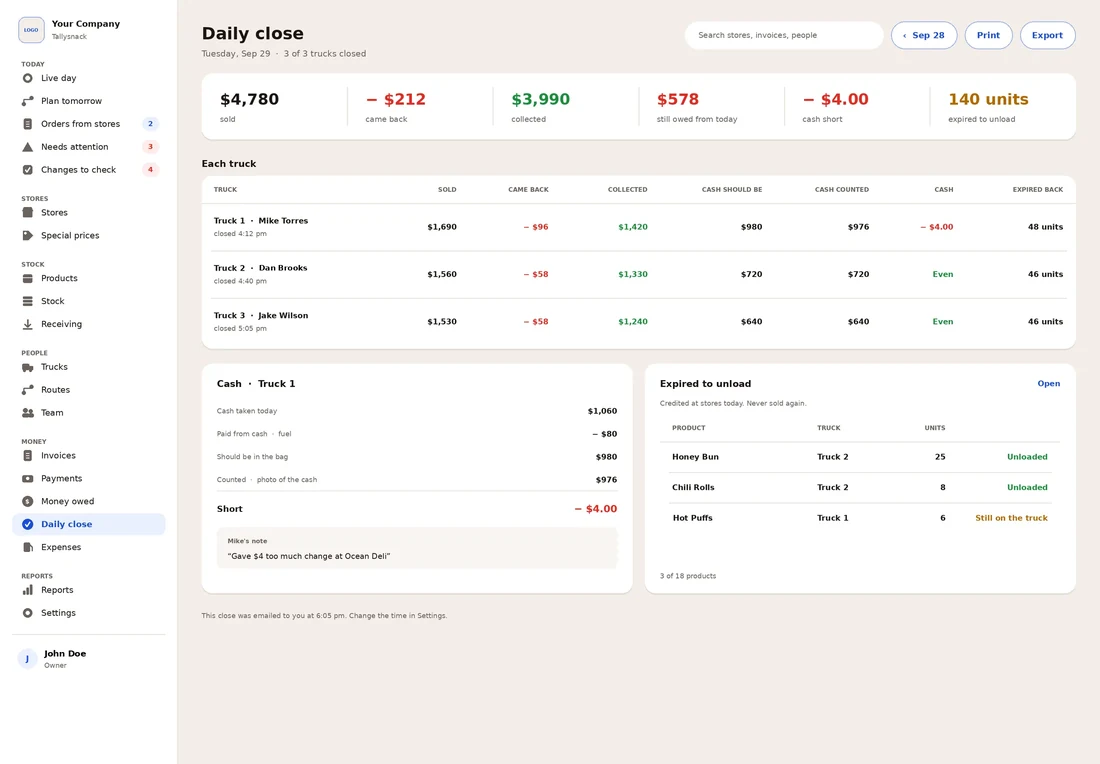
Tallysnack daily close: what each truck sold, collected and should have in cash, with a $4 short on truck 1 and the driver's note
Tallysnack’s daily close: each truck’s cash against its invoices, with the driver’s note on the $4 short. Example data; Tallysnack is in development.

Questions

Is it normal for route cash to be a little off?

Small differences happen, especially on paper routes with cash on delivery. What matters is whether the same driver, store or amount keeps showing up. Write each difference down so a pattern can be seen.

Why would the route be over instead of short?

Usually because money came in that was never written down: an old balance collected, an invoice copy lost, or a payment written as unpaid. Over is worth finding, because the same mistake can show up as short another day.

What does it mean if the difference divides evenly by 9?

It often means two digits were swapped when a number was written or added, like $54 written as $45 or $12.34 written as $12.43. About one in nine differences divide by 9 by chance, so treat it as a lead, not proof.

Can I take a shortage out of a driver’s pay?

Be careful. The U.S. Department of Labor says federal law does not allow a deduction that brings an employee’s pay below the required minimum wage or overtime pay, and its examples include making a minimum-wage employee repay a cash shortage. State laws can add their own rules. Check with the Department of Labor and your state labor office before taking any shortage out of pay.

How do I stop credits for product I don’t sell?

Check every returned item against your own product list before writing the credit, and compare the expired count to what you delivered to that store. Route software that keeps each store’s deliveries makes this check quicker.

Sources

Everything else on this page comes from our family’s experience running snack routes. It is general information, not legal or accounting advice.

Who we are. Tallysnack makes route software for direct store delivery (DSD) snack, candy and beverage distributors. It’s built by a family that has run snack routes for more than 30 years. See how it works